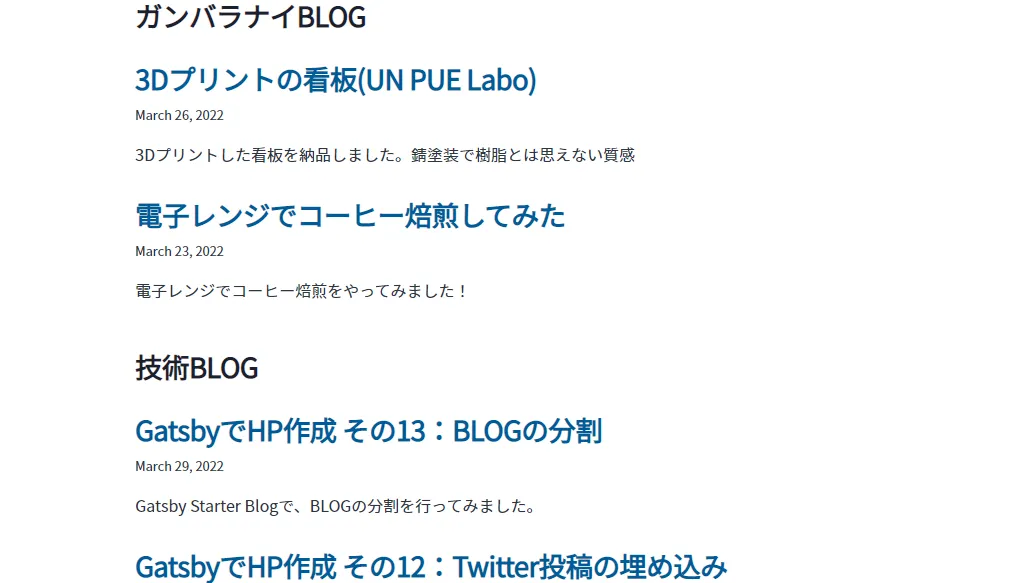
同じブログで、技術的な難しい内容と、ガンバラナイゆるい内容が入り混じっていると差がありすぎるので、ブログを分割してみました。
frontmatterに、blogという項目を設けて、Techとガンバラナイの2種のブログに分割するようにします。
投稿データ修正
すべての投稿記事のマークダウンのfrontmatterに、blog項目を追加。
---
title: GatsbyでHP作成 その9:投稿にヒーロー画像を追加
date: "2022-03-22T23:00:00.000Z"
description: "Gatsby Starter Blogで、投稿にヒーロー画像を追加します"
image: "./tk-qJDkJRTedNw-unsplash.jpg"
blog: "Tech"
---
記事ページの「次の記事」「前の記事」がブログごとになるようにする
それぞれのブログで前後の記事がリンクされるようにします。
const path = require(`path`)
const { createFilePath } = require(`gatsby-source-filesystem`)

exports.createPages = async ({ graphql, actions, reporter }) => {
  const { createPage } = actions

  // Get all markdown blog posts sorted by date
  const result = await graphql(
    `
      {
        allMarkdownRemark(
          sort: { fields: [frontmatter___date], order: ASC }
          limit: 1000
        ) {
          group(field: frontmatter___blog) {
            edges {
              node {
                id
                fields {
                  slug
                }
                frontmatter {
                  blog
                }
              }
            }
          }
        }
      }
    `
  )

  if (result.errors) {
    reporter.panicOnBuild(
      `There was an error loading your blog posts`,
      result.errors
    )
    return
  }

  // Define a template for blog post
  const blogPost = path.resolve(`./src/templates/blog-post.js`)

  const groups = result.data.allMarkdownRemark.group

  for (const {edges} of groups) {
    if (edges.length > 0) {
      edges.forEach(({node}, index) => {
        console.log(node.frontmatter.blog)
        const previousPostId = index === 0 ? null : edges[index - 1].node.id
        const nextPostId = index === edges.length - 1 ? null : edges[index + 1].node.id

        createPage({
          path: node.fields.slug,
          component: blogPost,
          context: {
            id: node.id,
            previousPostId,
            nextPostId,
          },
        })
      })
    }
  }
}graphqlのgroup(field: frontmatter___blog)で、blog項目ごとにグループ化しているのがポイントです。
これで、それぞれのブログで記事ごとの前後のリンクも独立しました。
トップページも、ブログごとにグループ化する
...
const BlogIndex = ({ data, location }) => {
  const siteTitle = data.site.siteMetadata?.title || `Title`
  const all_posts = data.allMarkdownRemark.nodes

  const blogs = [
    {
      label: "ガンバラナイBLOG",
      posts: all_posts.filter(node => {return node.frontmatter.blog==="ガンバラナイ"})
    },
    {
      label: "技術BLOG",
      posts: all_posts.filter(node => {return node.frontmatter.blog==="Tech"})
    }
  ]

  ...

      {blogs.map((blog => {
        return(
          <div>
            <h3>{blog.label}</h3>
            <ol style={{ listStyle: `none` }}>
              {blog.posts.map(post => {
                const title = post.frontmatter.title || post.fields.slug
                return (
                  <li key={post.fields.slug}>
                    <article
                      className="post-list-item"
                      itemScope
                      itemType="http://schema.org/Article"
                    >
                      <header>
                        <h2>
                          <Link to={post.fields.slug} itemProp="url">
                            <span itemProp="headline">{title}</span>
                          </Link>
                        </h2>
                        <small>{post.frontmatter.date}</small>
                      </header>
                      <section>
                        <p
                          dangerouslySetInnerHTML={{
                            __html: post.frontmatter.description || post.excerpt,
                          }}
                          itemProp="description"
                        />
                      </section>
                    </article>
                  </li>
                )
              })}
            </ol>
          </div>
          )
      }))}
    </Layout>
  )
}

export default BlogIndex

export const pageQuery = graphql`
  query {
    site {
      siteMetadata {
        title
      }
    }
    allMarkdownRemark(sort: { fields: [frontmatter___date], order: DESC }) {
      nodes {
        excerpt
        fields {
          slug
        }
        frontmatter {
          date(formatString: "MMMM DD, YYYY")
          title
          description
          blog
        }
      }
    }
  }
`
「ガンバラナイBLOG」と「技術BLOG」に分けて表示するようになりました。
少し、graphqlやページの生成について理解できてきました。